Warning: Undefined array key "find" in /home/u103243232/domains/howtodelete.io/public_html/wp-content/plugins/seo-by-rank-math-pro/includes/modules/image-seo/class-image-seo-pro.php on line 478
Warning: Undefined array key "replace" in /home/u103243232/domains/howtodelete.io/public_html/wp-content/plugins/seo-by-rank-math-pro/includes/modules/image-seo/class-image-seo-pro.php on line 478
Warning: Undefined array key "find" in /home/u103243232/domains/howtodelete.io/public_html/wp-content/plugins/seo-by-rank-math-pro/includes/modules/image-seo/class-image-seo-pro.php on line 474
Warning: Undefined array key "replace" in /home/u103243232/domains/howtodelete.io/public_html/wp-content/plugins/seo-by-rank-math-pro/includes/modules/image-seo/class-image-seo-pro.php on line 474
Warning: Undefined array key "find" in /home/u103243232/domains/howtodelete.io/public_html/wp-content/plugins/seo-by-rank-math-pro/includes/modules/image-seo/class-image-seo-pro.php on line 478
Warning: Undefined array key "replace" in /home/u103243232/domains/howtodelete.io/public_html/wp-content/plugins/seo-by-rank-math-pro/includes/modules/image-seo/class-image-seo-pro.php on line 478
Thinking of leaving Instagram in 2025? Whether it’s for privacy reasons, cutting down screen time, or starting fresh, deleting your Instagram account is simple but irreversible. Once deleted, your profile, photos, videos, followers, and likes will be gone permanently if you Delete Instagram account.
In this guide, we’ll show you step-by-step how to delete your Instagram account from mobile and desktop. We’ll also explain the difference between deleting vs deactivating, so you can make the right choice.
Key Difference: Delete vs Deactivate
- Instagram Delete Account (Permanent): All data, posts, followers, and DMs are erased forever. You cannot recover them.
- Deactivate Instagram Account (Temporary): Your profile is hidden, but you can log back in anytime and reactivate it.
If you’re unsure, try deactivation first.
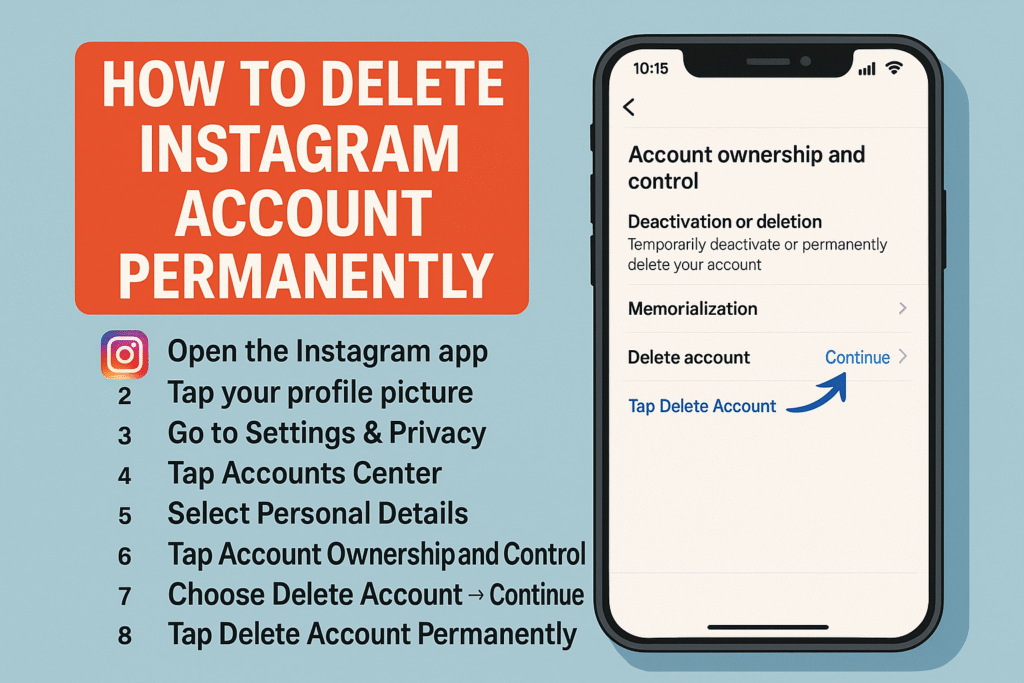
How to Delete Instagram Account on Mobile (iPhone & Android)
Tap Delete Account Permanently.
Open the Instagram app.
Tap your profile picture (bottom right).
Go to Settings & Privacy → Accounts Center.
Select Personal Details → Account Ownership and Control.
Tap Deactivation or Deletion.
Choose your account → Delete Account → Continue.
Select a reason → enter your password.
How to Delete Instagram Account on Desktop (Web Browser)
- Go to the official Instagram deletion page: Delete Instagram Account.
- Log in to your account if needed.
- Select a reason for deletion.
- Enter your password.
- Click Permanently Delete Account.
What Happens After Deletion?
- Instagram delays final deletion for 30 days.
- During this time, your account is hidden but not yet erased.
- After 30 days, all your data is permanently removed.
Important Notes
- You cannot recover a permanently deleted Instagram account.
- If you may want to come back, choose deactivation instead.
- Download a copy of your photos and videos before deleting:
- Go to Settings → Privacy and Security → Download Data.
Thinking of leaving Instagram in 2025? Whether it’s because of privacy concerns, too much screen time, or simply wanting a fresh start, deleting your Instagram account can feel like a big step. Many users around the world choose to leave Instagram every year, but the process isn’t always obvious. The good news is that Instagram now provides a direct and simple way to permanently delete your account both from the app and the web.
In this complete guide, you’ll learn how to delete your Instagram account permanently in 2025, what happens after you delete it, and alternative options if you’re not ready to take the final step. We’ll also cover some frequently asked questions to clear up common doubts.
Why People Delete Instagram in 2025
Social media plays a huge role in our lives, but it can sometimes be overwhelming. Many users report that constant notifications, algorithm-driven feeds, and privacy worries make them reconsider their online presence. With increasing discussions about digital detox and data protection, it’s not surprising that more people are searching for ways to quit Instagram permanently.
Deleting your account ensures that all your photos, videos, stories, messages, and even saved posts are completely removed from Instagram’s servers. If you are concerned about digital footprints or simply want to disconnect, this is the most secure way to do it.
Should You Delete or Deactivate Instagram Account?
Before you proceed, it’s important to understand the difference:
- Delete Account (Permanent): Your account, data, and all interactions vanish forever after a 30-day grace period. Once deleted, it cannot be recovered.
- Deactivate Account (Temporary): Your profile becomes invisible, but all your data is preserved. You can reactivate it by logging back in anytime.
If you just need a break, deactivation may be the safer choice. However, if you are determined to leave Instagram behind, permanent deletion is the way to go.
How Long Does It Take for Instagram to Delete an Account?
When you confirm deletion, Instagram schedules your account for permanent removal after 30 days. During this period, your account remains hidden, so no one can see it. If you log back in within those 30 days, you’ll have the option to cancel the deletion. After that, the process is irreversible and the company will remove instagram account permanently.
Conclusion
Deleting your Instagram account permanently in 2025 is easier than ever, thanks to Instagram’s updated app and desktop settings. Whether you’re doing it for privacy, productivity, or peace of mind, following the step-by-step guide above will ensure your data is erased properly.
If you’re unsure, consider deactivation first, since it gives you the option to return without losing everything. Whatever you decide, make sure to download your photos, videos, and other content before deletion so you don’t lose your memories forever.
FAQs
Q1. Can I delete Instagram without logging in?
No, you must log in to your account to delete it and to find instagram delete account link.
Q2. Can I recover my Instagram account after deletion?
No, once permanently deleted, recovery is impossible.
Q3. Can I delete Instagram from the app directly?
Yes, since 2023, Instagram allows deletion directly from the app (previously it was only on desktop).
Q4. What if I just want a break?
Use Deactivate Account — your profile will be hidden until you log back in.